

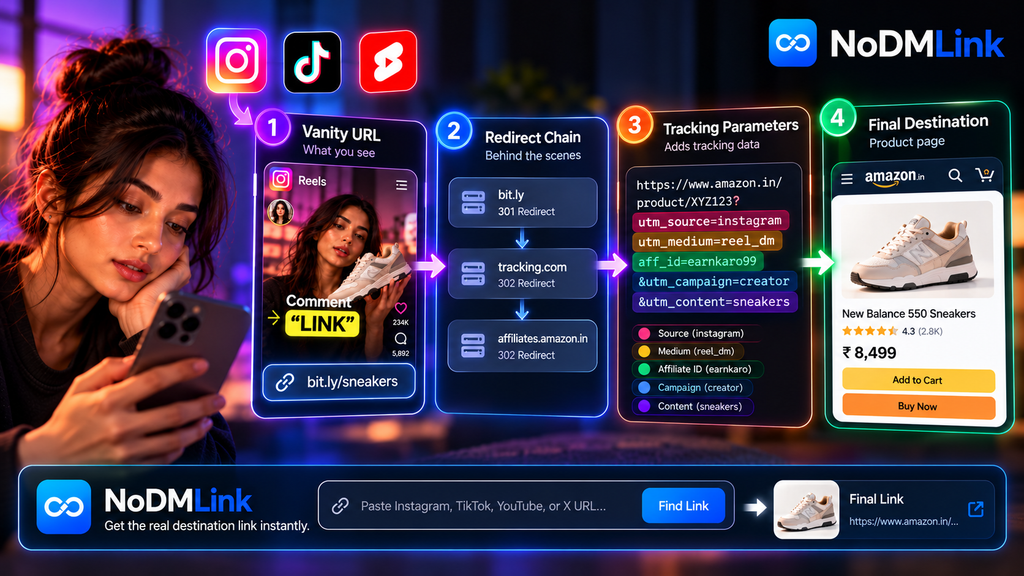
When you click a link on Instagram, TikTok, or YouTube, you almost never land on the exact URL you clicked. The modern web is built on complex routing systems. To monitor user behavior and monetize traffic, creators and platforms rely heavily on URL shorteners, hidden tracking parameters, and multi-hop redirect chains to mask the true destination. Understanding the anatomy of a social media link is critical for navigating the creator economy safely and efficiently.
Table of Contents
- The Vanity URL (The Surface Layer)
- The Redirect Chain (The Middleware)
- Tracking Parameters: UTMs and Affiliate Tags
- The Final Destination URL
- Decoding Links with Extraction Tools
- Frequently Asked Questions (FAQ)
The Vanity URL (The Surface Layer)
The link presented to a user on social media is rarely the actual webpage. It is usually a Vanity URL or a shortened link. Examples include domains like bit.ly, amzn.to, or custom branded shorteners like nyti.ms.
These surface-level links serve two primary purposes. First, they solve character limit constraints on platforms like Twitter (X) or within crowded Instagram bios. Second, they provide aesthetic cleanliness. A raw e-commerce product URL is often hundreds of characters long, filled with messy query strings. A short link like bit.ly/sneakers looks infinitely more trustworthy to the untrained eye, even if the user has no idea where it actually leads.
The Redirect Chain (The Middleware)
The magic of a shortened link relies entirely on HTTP status codes—specifically the 301 (Permanent) and 302 (Temporary) redirects. A shortened link is not a webpage; it is a server instruction.
When a user taps an amzn.to link in an Instagram DM, their browser executes a DNS lookup and pings the Amazon URL shortener server. The server does not return HTML content. Instead, it logs the user’s IP address, device type, and timestamp into an analytics database. Once the data is logged, the server responds with a 301 status code and a “Location” header containing the true destination URL. The user’s browser reads this header and immediately jumps to the new address.
This process happens in milliseconds. In complex affiliate marketing setups, a user might bounce through three or four different tracking servers before finally landing on the product page. This is called a redirect chain.
Tracking Parameters: UTMs and Affiliate Tags
Once the redirect chain finishes, the user lands on the final destination URL. However, this URL is heavily modified. If you inspect the address bar, you will see a long string of text following a question mark (?). This is the query string, which houses tracking parameters.
A standard URL looks like this:
https://store.com/product
A social media affiliate URL looks like this:
https://store.com/product?utm_source=instagram&utm_medium=reel_dm&aff_id=creator99
The ? tells the server that everything following it is actionable data. The & symbol chains multiple data points together. UTM (Urchin Tracking Module) parameters tell the brand exactly where the traffic came from (Instagram) and how it was delivered (Reel DM). The aff_id parameter is the most critical piece for the creator; it tells the server’s backend to drop a cookie in the user’s browser, ensuring the creator receives a financial commission if the user buys the product.
The Final Destination URL
The destination URL is the raw endpoint—the actual product page or article the user wanted to view. Creators and marketers deliberately hide this raw endpoint behind vanity URLs and redirect chains for a specific reason: commission protection.
If a creator simply told their audience, “Search for the Sony WH-1000XM5 headphones on Amazon,” the user would open their Amazon app, search for the item, and buy it. The creator would earn $0 because their affiliate cookie was never injected into the session. By masking the destination and forcing the user to click a specific link, the creator guarantees they get paid for the referral.
Decoding Links with Extraction Tools
Users are increasingly frustrated by this opaque routing system. They do not want to jump through tracking servers, nor do they want to wait for an automated DM just to see a pair of shoes. They want the raw destination URL.
This friction drives the utility of tools like NoDMLink. By pasting a social media video URL into the directory, the platform bypasses the creator’s DM automation entirely. It surfaces the underlying, raw destination URL submitted by the community, allowing the user to view the final endpoint immediately without interacting with a hidden redirect chain.
Frequently Asked Questions (FAQ)
Do shortened URLs slow down page load times?
Yes. Every redirect requires a separate DNS lookup and server response. A single 301 redirect might only add 100 milliseconds of latency, but a chain of three or four tracking redirects can noticeably degrade the mobile browsing experience, especially on slow cellular networks.
Can you manually strip tracking parameters from a URL?
Absolutely. Anything after the ? in a URL is almost always analytical data. You can delete the question mark and everything following it, hit enter, and the core webpage will still load perfectly. Doing this prevents the affiliate network from tracking your session.
Are vanity URLs secure?
The URLs themselves are just routing instructions. The danger lies in the obfuscation. Because you cannot see the destination of a bit.ly link before clicking it, malicious actors frequently use them to hide phishing sites or malware downloads. You should always trust the source before clicking a shortened URL.